Your process FMEA shouldn't live in a spreadsheet
Mitigon is the audit-ready FMEA platform for GxP environments. Aligned to 21 CFR Part 11, EU GMP Annex 11, ICH Q9(R1), GAMP 5, and ALCOA+. Every edit attributed, every version preserved, exports that carry the metadata an inspector asks for.
Create your workspace in 30 seconds. No credit card, no sales calls.
Excel wasn't built for FMEA
Regulated teams deserve better than fragmented spreadsheets and disconnected risk records. That's why we built Mitigon.
“Which version is current?”
Process_FMEA_v3_FINAL_QA-reviewed_Bob_FINAL2.xlsx on a shared drive. Your auditor asks for the approved version. Three people point to three different files.
“Who changed this severity score?”
During your last FDA inspection or notified body audit, you couldn't prove who downgraded that RPN from 48 to 12, or why. Excel doesn't track who did it or why.
“Show me the current risk landscape”
Your VP Quality asks for a risk summary before the management review. You spend two days manually building heat maps and pivot tables from a 200-row spreadsheet.
“The file is locked by another user”
QA, engineering, and manufacturing take turns editing one file. A cross-functional FMEA review that should take a day stretches into a three-week email chain.
How it works
Built on the worksheet. Extended with visual analysis.
The FMEA worksheet and risk matrix are the core of the platform. Visual analysis tools give your team additional ways to investigate and communicate risk.
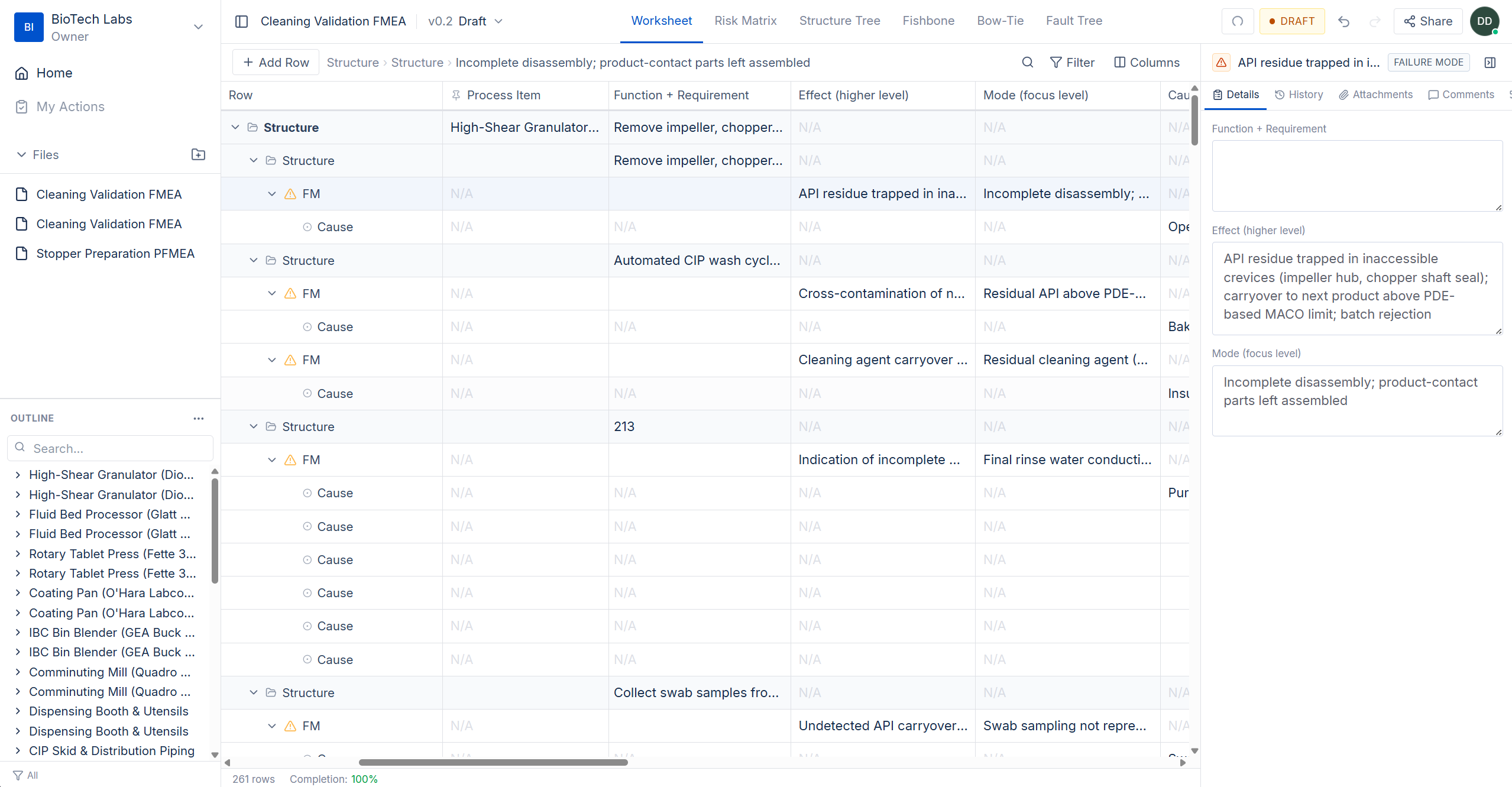
The structured table your team already knows, rebuilt for collaboration
A structured FMEA table with configurable columns and framework-specific scoring. QA scores severity while engineering documents controls. Simultaneously, in the same document.
- Configurable scoring frameworks (ICH Q9(R1), AIAG-VDA)
- Real-time multi-user editing with conflict handling
- Lifecycle states: Draft → In Review → Obsolete
- Import existing Excel FMEAs with intelligent column matching
The risk summary your management review actually needs
Severity × probability heat map that shows how many failure modes land in each zone. Click any zone to filter the worksheet. Export directly to your quality review deck. No manual chart building.
- Configurable severity and probability scales per framework
- Clustered data points showing failure mode count per cell
- Click-to-filter interaction with the worksheet
- Export-ready for PDF reports and presentations
Visual root-cause analysis that connects to your worksheet
Drag-and-drop Ishikawa diagrams with 6M categories. Each cause links directly to a failure mode in your FMEA, so root-cause analysis is never disconnected from your risk register.
- Interactive 6M cause-and-effect layout (Materials, Methods, Machines, People, Environment, Measurement)
- Drag-and-drop categories and sub-causes
- Bi-directional links to FMEA rows
- Collaborative editing in real time
Threats, controls, and consequences in one view
Map preventive controls and mitigation barriers around each hazardous event. Ideal for showing regulatory reviewers and your broader team how controls map to threats.
- Threats on the left, consequences on the right
- Color-coded prevention and mitigation barriers
- Linked to FMEA worksheet data
- Visual format preferred by regulatory reviewers for risk communication
See how risk distributes across your process
Decompose your process into unit operations, equipment, and components. Nodes are color-coded by risk, so you can instantly see which part of the process has the most exposure.
- Hierarchical process decomposition (2–5 configurable levels)
- Drag-and-drop node arrangement
- Risk-severity color coding per node
- Expand/collapse for focused analysis
Trace failure logic from top event to basic causes
Top-down failure logic with AND/OR gates. Trace how equipment failures, operator errors, and process deviations combine to reach the patient.
- AND/OR gate logic modeling
- Links to FMEA failure modes and causes
- Visual failure propagation paths
- Complements bottom-up FMEA with top-down analysis
Audit-Ready
Built for regulated teams
Compliance isn't a bolt-on. Audit trails, access control, and lifecycle management are built in, from first risk identification through periodic review.
Real-Time Collaboration
QA, engineering, and manufacturing edit the same FMEA simultaneously. Conflict handling keeps changes consistent. Checkout mode available on Pro for teams that need exclusive editing.
Immutable Audit Trail
Every change logged: who, what, when, before-state, after-state. Append-only. No edits, no deletions. Answer "who changed this and why?" in seconds, not days. ALCOA+ compliant.
Your Framework, Your Scales
ICH Q9(R1) for pharma quality risk management. ISO 14971 for medical device (roadmap). AIAG-VDA supported for teams that use it. Configure scoring scales, column layouts, and terminology per organisation.
Review & Approval Workflows
Route FMEAs through structured review cycles. In-line comments with @mentions. Configurable lifecycle: Draft, In Review, Approved, Effective. (Pro — request access)
Excel Import Wizard
Upload your existing .xlsx FMEAs and the import wizard fuzzy-matches your column headers to structured fields. Preview, adjust, import. Your scores and hierarchy carry over.
Lifecycle & Periodic Review
Track FMEAs from initial draft through approval to effective status. Set periodic review dates aligned with ICH Q9(R1) lifecycle principles. Archive previous versions with full traceability.
Designed to support: 21 CFR Part 11 · EU GMP Annex 11 · ICH Q9(R1) · ISO 14971 (roadmap) · ALCOA+ principles
Your Team
Your whole team, one workspace
Workflows for everyone involved in risk management: from first analysis through regulatory submission.
Quality Managers
Answer auditor questions in seconds, not days
Process Engineers
Focus on analysis, not spreadsheet maintenance
Regulatory Affairs
Demonstrate compliance with a complete, connected risk file
Consultants & CROs
Onboard client teams fast. No software installs required
Own the risk file with confidence. FMEA revisions are traceable, mitigations linked, and exports audit-ready.
- Full revision history with before/after state
- One-click audit-ready PDF and Excel exports
- Linked mitigations across the entire risk file
- E-signature workflows (Pro — request access)
Work in a structured FMEA worksheet with configurable scoring and framework support. Visual tools (fishbone, structure tree) available in beta on request.
- Visual fishbone and structure tree editors (beta)
- Bi-directional links to FMEA worksheet rows
- Drag-and-drop cause-and-effect modelling
- Configurable scoring scales per framework
Generate risk reports aligned to ICH Q9(R1). ISO 14971 support is on the roadmap. No more scattered spreadsheets across SharePoint.
- Built-in ICH Q9(R1) templates.
- Risk matrix exports for management review
- Complete traceability from hazard to control
- Structured data ready for regulatory submissions
Standardised templates and role-based access make multi-site FMEA management scalable and repeatable. Share via link.
- Role-based access with granular permissions
- Standardised templates across client sites
- Share via link. No installs required
- Multi-organisation workspace management
Why Switch
How Mitigon compares
Most teams run FMEA in Excel or inherit it from an enterprise QMS that was never built for risk analysis. Here is how Mitigon fits between the two.
Real-time collaboration
Visual analysis tools
Audit trail
Pharma-native (ICH Q9, EU GMP)
Browser-based
Free tier available
Implementation time
Validation burden on customer
Getting Started
Create your first FMEA in minutes
No RFP, no six-month implementation, no validation project to get started. Evaluate with real data on your terms.
Sign up free
Create your workspace in 30 seconds. No procurement paperwork, no IT tickets, no credit card.
Import or start fresh
Upload your existing Excel FMEAs or start from an ICH Q9 or AIAG/VDA template with pre-configured scoring scales.
Invite your team
Add QA, engineering, and manufacturing colleagues. Role-based access controls who can edit, review, and approve.
Analyze visually
Toggle between worksheet, risk matrix, and structure tree. Spot risk concentrations your spreadsheet hid.
Start managing risk, not spreadsheets
Build structured, traceable FMEAs today. Free for up to 10 FMEAs and 3 team members — enough to evaluate with a real project, not a sandbox demo.
Create your workspace in 30 seconds. No credit card, no sales calls.
Free forever for small teams. Upgrade to Pro when you need e-signatures, approval workflows, and advanced governance controls.
Frequently asked questions
Everything you need to know about Mitigon and FMEA.